
Weekly day-rate invoice for labourers and subcontractors (UK)
A weekly day-rate invoice lists each day you worked, the day rate, any overtime, materials at cost, and the CIS deduction on labour only. This guide shows what to put on it, then walks through a real finished invoice line by line, so your figures match your contractor's.
On this page
- What a weekly day-rate invoice must show
- Worked example: a full week, with overtime, materials and 20% CIS
- Days or hours? Show 8 hours at £20.625 and the line still comes to £165.00
- Part weeks, bank holidays and days you didn't work
- CIS and VAT: what changes on the invoice
- What to do when the contractor pays the wrong amount
- Repeat last week's invoice in seconds
- Common mistakes on weekly invoices
Updated 15 October 2026. The figures below are an invented example to show the method. They are not a recommended or typical rate for any trade.
What a weekly day-rate invoice must show
Start with the basics every UK invoice needs (our sole trader invoice requirements guide has the full list), then add the parts that make a weekly invoice easy for a contractor's accounts team to pay without questions:
- A unique invoice number and the issue date. Number them in order, one per week.
- Your name or trading name, address and contact details, and the contractor's name and address.
- The week covered. "Week 5 to 11 October" stops two invoices overlapping or a week being missed.
- One line per day worked, with the date, the site or job (a plot number or address helps), the day rate and the quantity (1 day, half a day).
- Overtime on its own, as hours and the rate used, so the contractor can see how it was priced.
- Materials at cost on separate lines, marked as materials. This is what keeps the CIS deduction off them.
- Your UTR, if you work under CIS. It isn't a general invoice rule, but contractors use it to check you with HMRC, so it is normal to include it.
- The total, and the amount payable after any CIS deduction, if you choose to show it.
- How and when to pay. Bank details, a payment reference and a due date are optional on a BillMyWeek invoice. Tick the ones you want shown.
If you aren't VAT registered, don't add VAT. If you are, see the CIS and VAT table below.
Worked example: a full week, with overtime, materials and 20% CIS
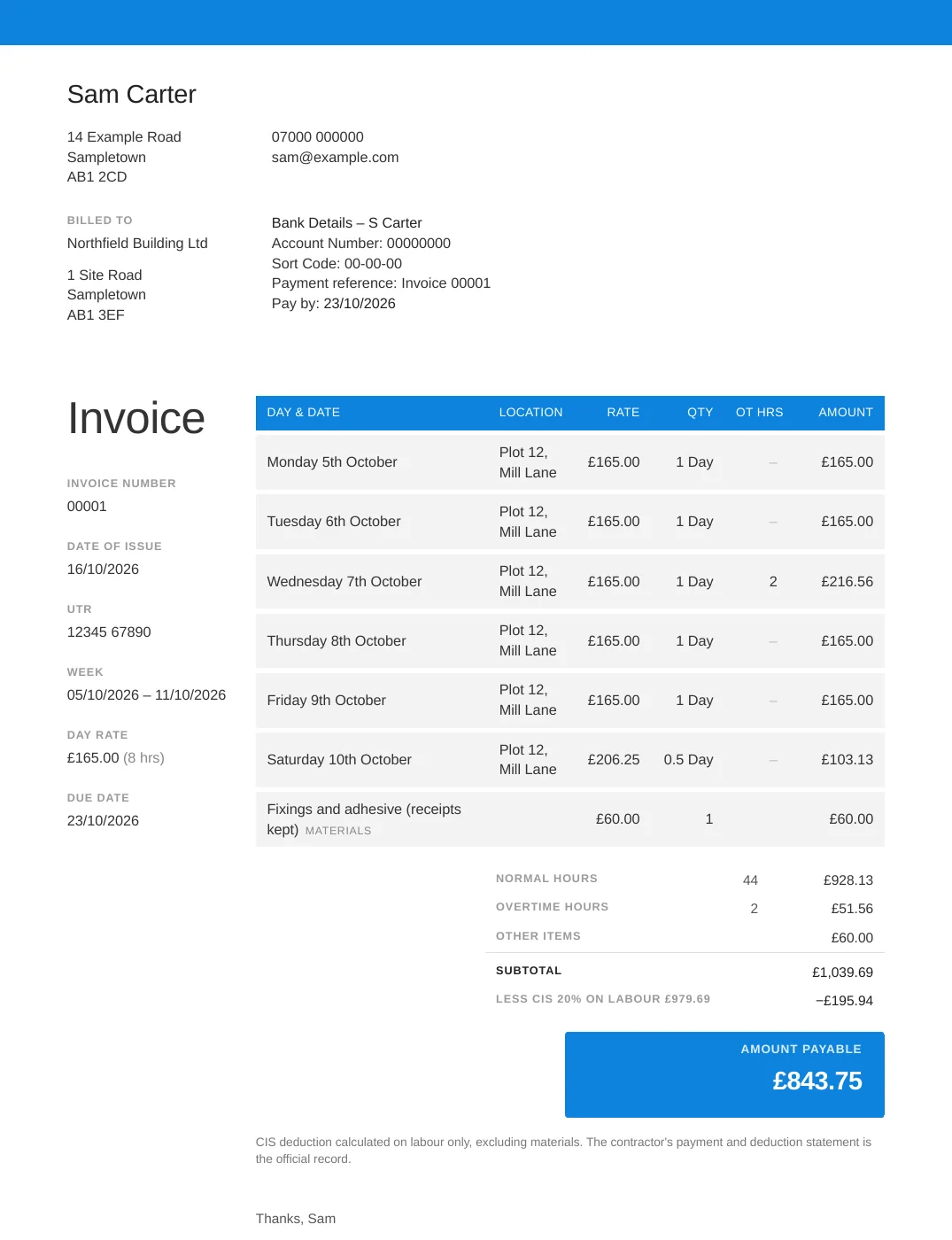
Sam is a labourer registered for CIS at the standard 20% rate and isn't VAT registered. He has agreed a day rate of £165 for an 8-hour day with the contractor, with overtime and Saturday work paid at time and a quarter (×1.25). Those terms are made up for this example. Here is the invoice BillMyWeek produced for his week:
Here is how every figure on it is worked out:
| Line | Working | Amount |
|---|---|---|
| Monday, Tuesday, Thursday, Friday | 4 days × £165.00 | £660.00 |
| Wednesday with 2 hours overtime | £165.00 + 2 h × £25.78125 (£20.625 × 1.25) = £216.5625 | £216.56 |
| Saturday, half a day (4 hours) | 4 h × £25.78125 = £103.125 | £103.13 |
| Labour | £660.00 + £216.56 + £103.13 | £979.69 |
| Fixings and adhesive (materials, receipts kept) | 1 × £60.00 at cost | £60.00 |
| Invoice subtotal | £979.69 + £60.00 | £1,039.69 |
| CIS deduction at 20% | 20% of labour only: £979.69 × 0.20 = £195.938 | −£195.94 |
| Amount payable | £1,039.69 − £195.94 | £843.75 |
Two things to notice. First, each line is worked out at full precision and only then rounded to the penny, which is why £103.125 shows as £103.13 and the totals still add up. Second, the deduction is taken from the £979.69 of labour, not the £1,039.69 total. If the £60 of materials had been hidden inside a labour line, the deduction would have been 20% of £1,039.69, or £207.94, which is £12 more taken up front.
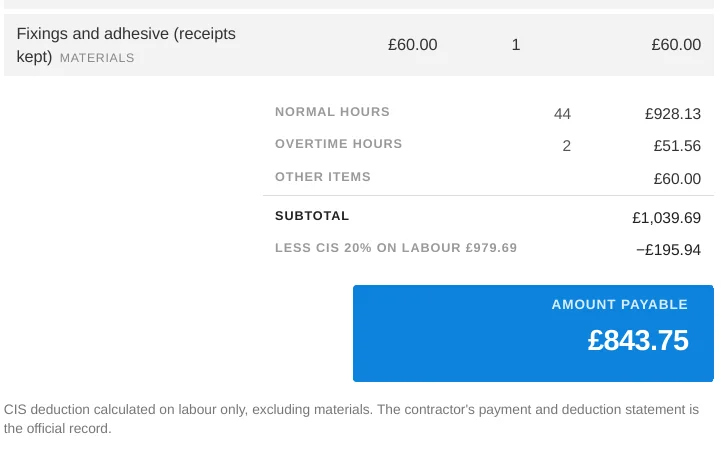
Under GOV.UK's rules for contractors, the deduction starts from the invoice total, then takes off what the subcontractor paid for directly, including materials, plant hire, consumable stores and fuel (except for travelling), and VAT. The CIS percentage is applied to what is left. A contractor can ask you for receipts, and if you don't have them they estimate the materials. So keep the receipts for anything you charge as materials.
Days or hours? Show 8 hours at £20.625 and the line still comes to £165.00
Some contractors want a day count. Others want hours. BillMyWeek lets you choose either with the "Show quantity as" setting on each invoice. In hours mode the rate is your day rate divided by your standard hours, kept at full precision:
£165 ÷ 8 hours = £20.625 an hour, and 8 hours × £20.625 = £165.00 exactly.
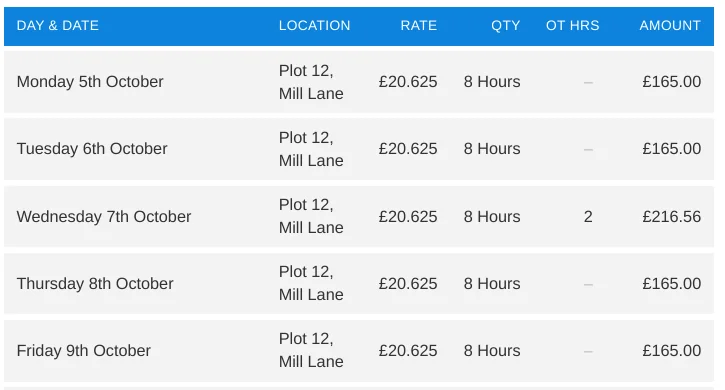
If you round the rate to £20.63 and multiply by 8 you get £165.04, which won't match the day rate you agreed. If you would rather have a tidy hourly rate, agree one that divides cleanly: £160 a day is £20 an hour and £168 a day is £21 an hour. Our day rate to hourly rate guide covers the rounding in more detail, and the day rate calculator does the sums for you.
Part weeks, bank holidays and days you didn't work
- Part weeks. Only list the days you worked. Starting on a Wednesday just means three day lines. The "week covered" line still shows the full Monday to Sunday period.
- Half days and short days. Either charge the hours at the exact hourly rate, as the Saturday above does, or use a fixed half-day rate if that is what you agreed. How to charge half days and part days compares the options.
- Bank holidays and rained-off days. Whether you charge for these depends on what you agreed with the contractor. GOV.UK says self-employed people don't get holiday or sick pay, and set their terms in their contract. Agree it in writing before the job, so the invoice just repeats the deal. See bank holiday rates for contractors.
- Two contractors in one week. Send each contractor their own invoice, with its own number and the days you worked for them. Each contractor works out their own CIS deduction.
CIS and VAT: what changes on the invoice
| Your situation | What to show |
|---|---|
| Registered for CIS (20%), not VAT registered | Labour and materials on separate lines. No VAT. The contractor deducts 20% from labour only. |
| Not registered for CIS (30%) | The same layout. The contractor must deduct 30% instead of 20%, so register to avoid the higher rate (see how to register as a CIS subcontractor). |
| Gross payment status (0%) | The same layout. There is no deduction, so the amount payable equals the invoice total. See gross payment status. |
| VAT registered, working for a contractor under CIS | Most building and construction services reported under CIS fall under the VAT domestic reverse charge. Your invoice needs the words "reverse charge", the VAT amount shown but not added to what is payable, and everything a normal VAT invoice shows. There are exceptions, such as customers who are end users, so check HMRC's guidance first. |
HMRC does not prescribe exact reverse charge wording, but its guidance says these examples meet the requirement: "reverse charge: VAT Act 1994 Section 55A applies", "reverse charge: S55A VATA 94 applies" and "reverse charge: Customer to pay the VAT to HMRC". The VAT to be accounted for under the reverse charge should be clearly stated on the invoice but not included in the amount shown as total VAT charged. See our domestic reverse charge invoice guide and VAT on contractor invoices.
What to do when the contractor pays the wrong amount
- Compare the payment to your invoice. Work out the amount you expected using the labour and materials split. A deduction taken from the whole total instead of labour is the usual cause.
- Ask for the remittance advice or a breakdown, in writing. Remittance advice explained shows what it should contain.
- Check the statement. When a contractor makes CIS deductions they must give you a payment and deduction statement within 14 days of the end of each tax month. GOV.UK's example: for the tax month 6 May to 5 June, the statement is due by 19 June. Keep every statement. See CIS payment and deduction statements.
- If too much was taken, you can account for the deductions in your tax return. How to claim back CIS deductions explains how.
- If the invoice is simply unpaid, see how to chase an unpaid invoice and our late payment interest guide, which explains the interest and fixed fee you can usually claim from another business.
Repeat last week's invoice in seconds
If you work the same site and rate week after week, the slow part of invoicing is typing the same days again. In BillMyWeek, Copy last week on your invoices page starts this week's invoice from your latest weekly one. You change the hours or overtime that were different and save. The rate, standard hours, UTR and CIS settings carry over from the invoice it copies, so you don't re-enter them. You can also tick which of bank details, due date and payment terms appear on the invoice.
Common mistakes on weekly invoices
- One lump sum for the whole week, with no dates, so nobody can check it.
- Materials mixed into labour, so the CIS deduction is taken on the wrong amount.
- Rounding the hourly rate instead of the line total, so the invoice is a few pence out.
- Reusing an invoice number, or skipping the week covered.
- Forgetting the UTR, which can delay payment while the contractor checks your details.
- Adding the expected deduction as if it was part of the price. Show it as the contractor's deduction, and treat their statement as the official record.
Frequently asked questions
Do I deduct CIS on my weekly invoice?
No. The contractor works out and makes the CIS deduction when they pay you. You can show the expected deduction on your invoice as a courtesy, but their payment and deduction statement is the official record.
Can I charge a day rate and still be self-employed?
A day rate doesn't decide your status on its own. GOV.UK says someone is probably self-employed if they are self-employed for tax purposes and most of a list of things are true, such as giving quotes, not being directly supervised, submitting invoices and not getting holiday or sick pay. You can check your status with HMRC's online tool.
How do I show overtime on a weekly invoice?
Show overtime hours separately from the normal day, with the hourly rate you used. On a £165 day of 8 hours, time and a quarter is £25.78125 an hour, so 2 hours is £51.56 once the line is rounded.
Do I put my UTR on every invoice?
It isn't a general legal requirement, but contractors use your UTR to check you with HMRC, so most CIS subcontractors include it on every invoice.
Should my invoice show the CIS deduction or just the gross amount?
Either works. Many subcontractors show the labour, the materials, the expected deduction and the amount payable so the figures are easy to reconcile. The deduction on the invoice is an expectation. The contractor's statement is the record.
What if I work for two contractors in the same week?
Send a separate invoice to each, with its own number and only the days worked for that contractor. Each contractor deducts CIS on what they pay you.
Sources
- What you must do as a CIS subcontractor – GOV.UK
- CIS contractors: make deductions and pay subcontractors – GOV.UK
- Check when you must use the VAT domestic reverse charge for building and construction services – GOV.UK
- VATREVCON37100: reverse charge invoices – HMRC internal manual
- Employment status: self-employed and contractor – GOV.UK
This guide is general information, not legal, tax or financial advice. Rules and rates change, so check the linked GOV.UK pages for the current position.